MZCS Application Commands
MZCS Start Process
MZCS can be executed as a standalone application from the CLI or it can be controlled and run from the Process-handler. The service can be started by following the specified pattern,
monoZConnectService.exe-c<COM Port>
<upon success>
MZOK
<upon failure>
MZNG
Defined Values
COM Port
Maximum Response Time
| 15s |
MZCS Device Initialization
This API establishes the communication with the MZC device and check the device’s configuration status. If MZC device is not configured, the service will be closed and an appropriate message will be displayed. To ensure proper usage, this API must be called first after the start of MZCS application.
mzcs_init
<upon success>
MZOK
<upon failure>
MZRUNDEVICECONFIG
MZNG
Defined Values
None
Maximum Response Time
| 311 s + 900 ms |
MZCS Device Configuration
The main function of this API is to set up the MZC device by configuring its Band, APN, LwM2M settings. The configured settings will be saved in the device memory. Once the device has been successfully configured, this API returns the endpoint name that will be used for further communication with the PF. Additionally, the application will close its service upon completion of this API. It is recommended to use this API when initially configuring the device or when updating the existing settings. However, frequent usage of this API should be avoided as it is intended for configuring the device only.
mzcs_devcfg
<upon success>
MZOK
<upon failure>
MZNG
Defined Values
None
Maximum Response Time
| 1407 s + 200 ms |
MZCS Set Network Attach
To establish communication with the Server/Platform (PF), the MZC device needs network connectivity, which can be enabled by using this API. It is important to note that the usage of this API should be restricted to the following conditions:
- It must be called after a successful execution of the “MZCS Device Initialization” API.
- It should not be called before network disconnection (network detach).
- It should not be called until the registration interval expires. For more information, please refer to “Network Attach Attempt”.
mzcs_nwattach
<upon success>
MZOK
<upon failure>
MZNG
Defined Values
None
Maximum Response Time
| 530 s + 200 ms |
MZCS Set Data
This API enables the storage of data on the device for a specific Object ID, Instance ID, Resource ID. It is important to note that the data must be in Hex format and must not exceed the specified limit of 1428 bytes after conversion to Hex. This stored data will be transferred to the server, whenever there’s a read request from the server.
mzcs_setdata: -o <OID> -i <IID> -r <RID> -d <Data>
<upon success>
MZOK
<upon failure>
MZNG
Defined Values
OID:
LwM2M Object (19)
IID:
LwM2M Instance (0~2)
RID:
LwM2M Resource (0)
Data:
Hex string (max. 1428 bytes)
Maximum Response Time
| 15 s + 100 ms |
MZCS Send Data
This API enables transfer of data to the server for a specific Object ID, Instance ID, Resource ID. Additionally, it overwrites the previous stored data on the device. It is important to note that the data must be in Hex format and must not exceed the specified limit of 1428 bytes after conversion to Hex.
This API has a restriction on the frequency of usage, which is set to 900 second by default. For more information, please refer Section 5.7 Send Data Limitation Lock in the MZCS message description.
1. mzcs_senddata: -o <OID> -i <IID> -r <RID> -d <Data> -a <ACK>
2. mzcs_senddata: -o <OID> -i <IID> -r <RID> -d <Data> -d <Data>
<upon success>
MZOK
<upon failure>
MZNG
Defined Values
OID:
LwM2M Object (19)
IID:
LwM2M Instance (0~2)
RID:
LwM2M Resource (0)
Data:
Hex string (max. 1428 bytes)
ACK:
0: Non conformable notify
1: Conformable notify (default)
Maximum Response Time
| 245 s + 200 ms |
Please note that if the send data API returns with MZNG after displaying the message “Sending OK”, MZCS will clear the data stored on the device for the specified OID, IID and RID by replacing it with null data.
MZCS Get RF Status
This API provides the RF status of the device. If -r is used in the API it provides raw RF info, and if it is not used then RF status is provided in simplified form.
mzcs_rf -r
<upon success - simplified>
RF status: [1] Good
           [2] Poor
           [3] Bad
           [4] Cell searching
           [5] No service:
MZOK
<upon failure - simplified>
RF status: [6] No response
MZNG
<upon success - raw>
<earfcn>,<cellID>,<RSRP>,<RSRQ>,<SINR>
MZOK
<upon failure - raw>
MZNG
Defined Values
None
Maximum Response Time
| 15 s + 100 ms |
MZCS Device Reset
This API allows the user to restart the MZC device, returning it to its default state without altering any configuration settings. Following the reset the user must initiate the “MZCS Network Attach” API to reconnect and re-register with the network.
mzcs_devicereset
<upon success>
MZOK
<upon failure>
MZNG
Defined Values
None
Maximum Response Time
| 120 s + 100ms |
MZCS Device Heartbeat Check
This API enables the user to verify if the MZC device is currently active.
mzcs_heartbeat
<upon success>
MZOK
<upon failure>
MZNG
Defined Values
None
Maximum Response Time
| 30 s + 200ms |
MZCS Set LED
This API enables the user to control the Red (LED1) and Blue (LED2) LED, allowing them to turn it on, off, or make it blink.
1. mzcs_led: -l <LED> -m <Mode> -t <Time ms>
2. mzcs_led: -l <LED> -m <Mode>
<upon success>
MZOK
<upon failure>
MZNG
Defined Values
LED
0: Both, 1: LED1, 2: LED2
Mode:
0: OFF, 1: ON, 2: BLINK
Time:
100 ms ~ 3000 ms (500 ms default)
Maximum Response Time
| 66 s |
MZCS Get COM Port
This API provides the COM port number being used for communication between the application and the MZC device.
mzcs_com: ?
<upon success>
Port:<COM Port>
MZOK
<upon failure>
MZNG
Defined Values
code?:
Query
Maximum Response Time
| 500 ms |
MZCS Help
This API enumerates the available API commands that are supported.
mzcs_help
<upon success>
List of API
MZOK
<upon failure>
MZNG
Defined Values
None
Maximum Response Time
| 500 ms |
MZCS Stop Process
This API terminates the MZCS process and shut down its related services
mzcs_stop
<upon success>
MZOK
<upon failure>
MZNG
Defined Values
None
Maximum Response Time
| 391s + 100 ms |
MZCS MESSAGE/ACK DESCRIPTION
MZOK
MZOK represents that the process has been completed successfully and the service application is ready to receive next request.
MZNG
MZNG represents that the process is not a success and the service application is ready to receive next request.
Connection ACK
Connection ACK, compress of two message “Connection OK/Connection NG”. It states connection of the MZCS with the PF is Success/Fail respectively.
Registration ACK
Registration ACK, compress of two message “Registration OK/Registration NG”. It states that the registration process of the MZC with the PF is Success/Fail respectively.
Note 1: If the registration is not a success, retry network attach process by using “MZCS Network Attach” API.
Note 2: If the registration is still not a success after retry, contact the necessary party.
Observe ACK
On receiving observe from the PF, service application will provide the details of observe received. If the observe message has code [0], meaning the device has been provided with the token for sending the data to PF. If the observe message has code [1], meaning the token has been cancelled. Cancellation of the token could be, due to the token has expired.
Message:
MZOBSERVE, <CODE>, <OID>, <IID>, <RID>
Parameters
CODE: OID: IID: RID: Note 1: Before using “MZCS Send data” API, receiving observe start token is a must.
Note 2: After Observe cancel, PF will not accept data. Hence the user has to wait for the next observe start token.
Notify Process ACK
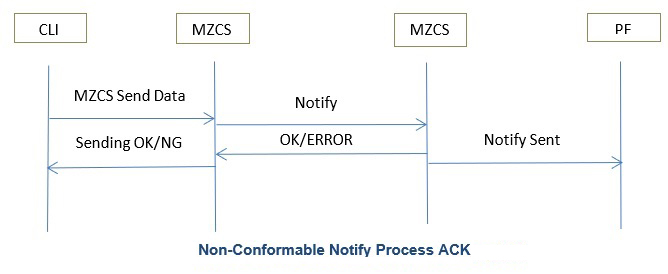
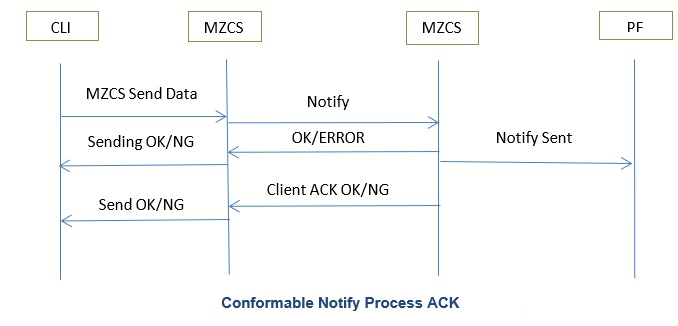
“MZCS Send data” API will display the following message as shown on the line diagram below, based on the acknowledgement option chosen. Sending OK/NG if acknowledgment option is chosen as Non-Conformable notify, refer Figure 2 and Send OK/NG & Sending OK/NG if acknowledgment option is chosen as conformable notify, refer Figure 3.
Send Data Limitation Lock
“MZCS Send data” API will be locked for 900 seconds after its usage, in order to restrict the data being transferred to PF. When lock is released the following message will be seen “MZSEND,1,00:00:00” where, [1] unlocked.
On using “MZCS Send data” API when lock is in progress the following message will be seen “MZSEND,0,HH:MM:SS” where, [0] Locked; HH:MM:SS represents the absolute wait time.
Write/DL Request
On receiving Write request from the PF, service application will provide the information as follows,
Message:
MZDLREQ,<OID>,<IID>,<RID>,<DATA>
Parameters
OID: IID: RID: Data: Network Attach Attempt
In MZC, for a successful registration it requires a minimum of 242 second interval before the retry/re-use of “MZCS Network Attach” API. Hence, the MZCS locks the “MZCS Network attach” API usage, the following message will be seen on lock release, “MZNW,1,00:00:00” where, [1] unlocked.
On using the “MZCS Network Attach” API when lock is in progress, the following message will be seen “MZNW,0,HH:MM:SS” where, [0] Locked; HH:MM:SS represents the absolute wait time.
COM Port Disconnection
After the start of the application, if the COM port is disconnected the following message will be seen < COM port> disconnected.
User Request During Ongoing Process
During an API is in progress on receiving a new request, MZCS respond with the following message “MZPROCESSRUNNING”.
Device Failure
If an API failed and MZCS responded with the following message “MZCSDEVICEFAILURE”. Follow the below steps,
- Ensure if the MZCS service has been ended, if not wait for the service to end.
- Disconnect the device from the PC.
- Reconnect the device with the PC after few minutes.
- Now run the application again.
- If the issue still prevails contact the necessary party.
Valid Request
On receiving a API request, MZCS validate the request and the following arguments (if any). For a successful validation MZCS respond with, “Valid Request.”.
Invalid Request
On receiving a API request, MZCS validate the request and the following arguments (if any). For an unsuccessful validation MZCS respond with, “Invalid Request.”.